Alteruna Multiplayer Docs
Multiplayer Class
The component MultiplayerManager gives access to all functionality and communication for Alteruna Multiplayer.
Definition
Namespace: AlterunaComponents
Assembly: Alteruna.Multiplayer.UnityFiles (in Alteruna.Multiplayer.UnityFiles.dll) Version: 1.0.0+c5328b35489e83c42e288435f5acf6115fd519e0
Assembly: Alteruna.Multiplayer.UnityFiles (in Alteruna.Multiplayer.UnityFiles.dll) Version: 1.0.0+c5328b35489e83c42e288435f5acf6115fd519e0
C#
[ObsoleteAttribute("Use MultiplayerManager instead of Multiplayer.
One can be created in the right-click menu.")]
public sealed class Multiplayer : MultiplayerManager- Inheritance
- Object Object Component Behaviour MonoBehaviour MultiplayerManager Multiplayer
Remarks
When a reference for MultiplayerManager is needed, it is recommended to inherit from CommunicationBridge or one of its many inheritors, such as AttributesSync. Other methods, such as using MultiplayerManager.Instance or creating a serialized property in the scene will not work with the MultiClientSimulation tool.
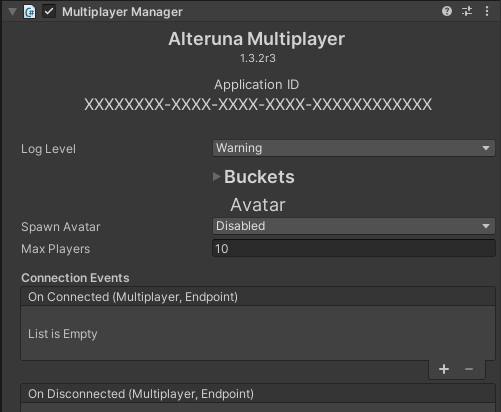
Example
Accessing users
An example of how you can use MultiplayerManager to access all user ids in the current room.C#
public class MyClass : CommunicationBridge
{
    public ushort[] GetUserIDs()
    {
        return
            // Get all users in the current room
            Multiplayer.GetUsers()
            // Select user Index
            .Select(u => u.Index)
            // return as an array
            .ToArray();
    }
}
Creating custom rooms
An example of how you can create a room using CreatePrivateRoom(String, UInt16, Boolean, Boolean) and RoomArgs.C#
public class MyClass : CommunicationBridge
{
       private readonly RoomArgs _roomSettings = new RoomArgs
       {
           // At most four players can be in this room at once.
           MaxUsers = 4,
           // The user joins the room upon creation.
           JoinRoom = true,
       };

       public void CreatePrivateRoom()
       {
           Multiplayer.CreatePrivateRoom(_roomSettings);
       }
}